---
title: "Universal Compact View"
description: "Embed Bynder asset selection directly in your web app — handles UI, authentication, and API requests out of the box."
url: "https://developers.bynder.com/universal-compact-view"
image: "https://developers.bynder.com/_og/d/c_Ocean.takumi,title_Universal+Compact+View,description_~RW1iZWQgQnluZGVyIGFzc2V0IHNlbGVjdGlvbiBkaXJlY3RseSBpbiB5b3VyIHdlYiBhcHAg4oCUIGhhbmRsZXMgVUksIGF1dGhlbnRpY2F0aW9uLCBhbmQgQVBJIHJlcXVlc3RzIG91dCBvZiB0aGUgYm94Lg,props_eyJ0aGVtZSI6eyJtb2RlIjoibGlnaHQiLCJjb2xvcnMiOnsicHJpbWFyeSI6IiMxMjZERkUifX19,p_Ii91bml2ZXJzYWwtY29tcGFjdC12aWV3Ig,s_HGCec8VC5ev949AC.png"
---
# Universal Compact View
Add asset selection from the Bynder DAM to any web app. The component handles UI, authentication, API requests, filtering, sorting and selection — so you ship features, not file pickers.
[Live demo ↗](https://bynder.github.io/bynder-compactview/)[npm package ↗](https://www.npmjs.com/package/@bynder/compact-view)
## [What it does](#what-it-does)
### UI included
Replicates the Bynder look and feel. Search, filter, sort and select are all built in - no design work required.
### Auth handled
Works with all Bynder and WebDAM auth methods. Pass an existing access token to skip the login screen entirely.
### Flexible modes
Single select, multi-select, or file-level selection. Open as a modal or mount in a container element on your page.
### Configurable
Pre-set a portal, lock asset types, apply a custom theme, prefill filters and pre-select assets via config.
[See the Universal Compact View in action](https://bynder.github.io/bynder-compactview/)
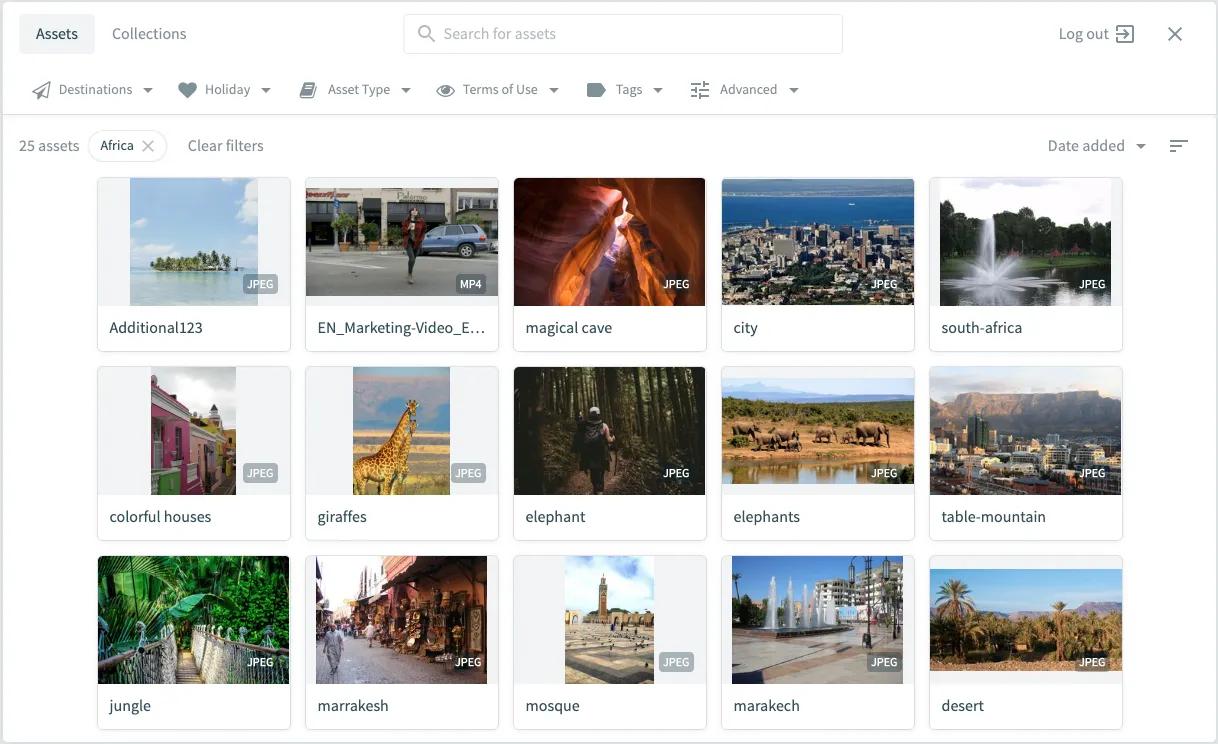
The Universal Compact View is the easiest way to get assets from the DAM into your web application. It's a component built with Typescript that allows developers to add support for selecting and importing assets from the DAM without having to worry about the intricacies related to building a file picker: UI design, authentication, API requests, etc. This component fetches the assets and their metadata through the API's and renders it by replicating the Bynder look & feel. Users can query, filter (by smartfilters, metaproperties, tags, keyword, and existing collections), sort, and select assets to then import them into another application.
Universal Compact View works with all methods of authentication that your Bynder and WebDAM portal supports.
[Universal Compact View on Bynder Knowledge Base](https://support.bynder.com/hc/en-us/sections/16936397091858-Universal-Compact-View-UCV)
### [**Demo**](#demo)
For a demo of the Universal Compact View latest version and its configuration options check out our demo page at [https://bynder.github.io/bynder-compactview/](https://bynder.github.io/bynder-compactview/).
### [**Screenshots**](#screenshots)
## [Example Usage](#example-usage)
```html
Universal Compact View
```
Once the assets are selected, they are submitted by the Universal Compact View using CustomEvents. They will be returned in an array of objects that can be handled in your page. In the example above we use a `div` with id `importedAssets` that will be filled with the assets urls. This response array contains all of the information about the assets from the Bynder portal, including all public derivatives.
List of available asset derivatives can be retrieved by the API call: [Retrieve Derivatives](https://developers.bynder.com/apis/account-api-1/versions/c8396a1a-c88c-416a-940f-8161e23ef316/paths/api-v4-account-derivatives/get).
[https://codesandbox.io/p/sandbox/ucv-examplpe-app-rhtqrj](https://codesandbox.io/p/sandbox/ucv-examplpe-app-rhtqrj)
### [**How it works**](#how-it-works)
We have two available methods available for implementing the UCV. Either the Cloudfront distribution URL can be used or you can download the NPM package.
### npm
Install the package and import `BynderCompactView` into your app.
```bash
npm install @bynder/compact-view
```
[npm ↗](https://www.npmjs.com/package/@bynder/compact-view)
### CDN
Add the script tag to any HTML page — no build step needed. The `-6-latest.js` script always resolves to the latest 6.x release (currently 6.1.0).
```html
```
Always resolves to latest 6.x
## [Quick start](#quick-start)
Open the asset picker with three lines of JavaScript:
```javascript
BynderCompactView.Open({
portal: { url: 'your-portal.getbynder.com' },
onSuccess: function(assets, additionalInfo) {
console.log(assets);
}
});
```
Selected assets are returned as an array via the `onSuccess` callback. Each object contains the full asset metadata from your portal including all public derivatives. Use `assetFieldSelection` to limit which fields are returned and reduce payload size.
Try a working example on [CodeSandbox ↗](https://codesandbox.io/p/sandbox/ucv-examplpe-app-rhtqrj).
## [Configuration](#configuration)
All options are optional unless stated.
| Option | Possible Values | Default | Description |
| :---------------------------- | :--------------------------------------------------------------------- | :------------- | :------------------------------------------------------------------------------- |
| onSuccess | function (assets: array(asset), additionalInfo?: AdditionalInfo): void | console.log | Callback invoked when assets are confirmed.Receives (assets: Asset[], additionalInfo?: AdditionalInfo) |
| portal | {url: string, editable: bool} | — | Portal configuration object |
| portal.url | A string containing Bynder portal URL | — | Set a default portal URL for the Compact View login screen seton the Login component if using the npm package package |
| portal.editable | true , false | true | Set false to lock the component to a single portal |
| mode | "MultiSelect", "SingleSelect", "SingleSelectFile" | "SingleSelect" | Set the Compact View to allow multiple or single asset selection |
| assetTypes | ['AUDIO', 'DOCUMENT', 'IMAGE', 'VIDEO'] | all | Limit selectable types: "IMAGE", "VIDEO", "DOCUMENT", "AUDIO" |
| assetFieldSelection | string | all fields | Multiline string of GraphQL field names to include in the response.See Asset field selection below |
| language | string | "en_US" | UI language: "en_US", "nl_NL", "de_DE", "fr_FR", "es_ES" |
| authentication | { getAccessToken: () => '', hideLogout: false } | — | Authentication config object.(Set on the Login component if using the npm package package) |
| authentication.getAccessToken | () => '' | — | () => string — return an existingOAuth token to bypass the login flow |
| authentication.hideLogout | true, false | false | Hide the logout button. Only valid whenusing authentication.getAccessToken |
| container | A Dom.HTMLElement instance | — | A DOM element to use as the UCV container (disables modal).See Container mode |
| defaultSearchTerm | string | — | Pre-populate the search input on open |
| selectedAssets | ["id1", "id2", "id3"] | [] | An array of asset IDs to pre-select.In non-MultiSelect modes, the last ID is selected |
| assetFilter | AssetFilterJson | — | Predefined filters applied on open. See AssetFilterJson type below |
| theme | Theme | — | Override primary colours to match your app. See Theme type below |
| hideExternalAccess | true, false | false | Remove access to external DAM assets and collections |
| hideLimitedUse | true, false | false | If true, limited assets will be hidden for all users. |
| selectAllOption | true, false | false | Show a select-all control in MultiSelect mode |
| hideSwitch | true, false | false | Property to hide switch between Assets and Collections |
| modalStyles | {"width": "100%"} | — | An object with CSS properties for the modal wrapper, e.g. {"width": "90%"} |
| onLogout | () => void | — | `Callback, will be fired after logout |
| noCache | true, false | false | Property to disable frontend cache inside UCV |
| defaultImageDerivativeName | string | — | Case-sensitive name of the image derivative topre-select in the response |
| defaultVideoDerivativeName | string | — | Case-sensitive name of the video derivative topre-select in the response |
| isPersonal | true, false | false | Filter asset requests to show only personal assets |
| enableDASH | true, false | false | Enable the DASH option in the adaptive video streaming selector |
| embedType | string | "script" | Predefine AVS embed code format: "script" or "iframe" |
| resetStoreOnMount | true, false | false | Reset internal state on mount when using container mode |
| enableDATPermissionManagement | true, false | false | This will enforce permissions for the DAT Transformation UI.If this is set to 'true', users will only see the DAT Transformation UIin the UCV if they have the 'Create Transformations' permissionin their Bynder Permission profile. |
```typescript
type AdditionalInfo = { selectedFile?: File }
type File = { url: string; width?: number; height?: number; fileSize?: number; }
type MetapropertyName = string;
type MetapropertyOptionName = string;
type MetapropertyOptionId = string;
type PredefinedMetapropertiesOptionsType = {
MetapropertyName: { MetapropertyOptionName: MetapropertyOptionId }
}
type AssetFilterJson = {
predefinedAssetType?: AssetType[]; //predefined asset types
collectionId?: string; //predefined collection id. Predefined collection ID should be provided in base64Encoded format (Collection_id 737141DC-7562-49C4-8BD8F6628578028A)
predefinedMetapropertiesOptions?: PredefinedMetapropertiesOptionsType; //predefined metaproperty IDs
searchTerm?: string; //predefined search term
predefinedTagNames?: string[]; //predefined tags
isLimitedUse?: boolean; //whether or not this asset is marked as Limited Use
showToolbar?: boolean; //show toolbar for predefined filters (false by default)
};
Predefined 'collection ID' should be provided in base64Encoded format '(Collection_id 737141DC-7562-49C4-8BD8F6628578028A)' = 'KENvbGxlY3Rpb25faWQgNzM3MTQxREMtNzU2Mi00OUM0LThCRDhGNjYyODU3ODAyOEEp'
type AssetType = 'AUDIO' | 'DOCUMENT' | 'IMAGE' | 'VIDEO'
type Theme = {
colorPrimary?: CSSColor;
colorButtonPrimary?: CSSColor;
colorButtonPrimaryLabel?: CSSColor;
colorButtonPrimaryActive?: CSSColor;
colorButtonPrimaryHover?: CSSColor;
colorButtonPrimaryHoverLabel?: CSSColor;
};
```
## [Asset field selection](#asset-field-selection)
Pass `assetFieldSelection` as a multiline string of field names to control what the `onSuccess` callback returns. Requesting only needed fields reduces payload size.
```javascript
databaseId
name
files
url
tags
textMetaproperties {
name
value
}
metaproperties {
nodes {
name
options {
name
displayLabel
}
}
}
```
Full Example
## [For Legacy browsers](#for-legacy-browsers)
```javascript
"databaseId \
name \
files \
url \
tags \
..."
```
Fields accepted by `assetFieldSelection`:
```text
databaseId name description type
url createdAt publishedAt updatedAt
fileSize height width orientation
isArchived brandId files copyright
extensions isLimitedUse isPublic isWatermarked
tags originalUrl
metaproperties { nodes { ... } }
textMetaproperties { name value }
```
## [Asset response](#asset-response)
`onSuccess` receives `(assets: Asset[], additionalInfo?: AdditionalInfo)`. Full asset type:
```typescript
interface Asset {
# Asset ID.
id: ID!
# Asset database Id.
databaseId: String!
# Asset name.
name: String!
# Asset description.
description: String
# Asset type. Possible values are: IMAGE, DOCUMENT, AUDIO and VIDEO.
type: AssetType!
# The HTTP URL for this payload.asset.
url: URI!
# Date created.
createdAt: DateTime!
# User who created the payload.asset.
createdBy: User
# Date published.
publishedAt: DateTime
# Date updated.
updatedAt: DateTime
# Size of the asset file in bytes.
fileSize: Int!
# Height of the original asset file.
height: Int!
# Width of the original asset file.
width: Int!
# Asset orientation. Possible values are: PORTRAIT, LANDSCAPE, SQUARE.
orientation: Orientation!
# Whether or not this asset is archived.
#
# Knowledge base entry
isArchived: Boolean!
# Brand ID.
brandId: String
# Files associated with the payload.asset.
files: JSONObject!
# Copyright of the payload.asset.
copyright: String
# Extensions of the asset file. This can have more than one value in case of a
# derivative with different extensions.
extensions: [String!]!
# Whether or not this asset is marked as Limited Use.
#
# Knowledge base entry
isLimitedUse: Boolean!
# Whether or not this asset is marked as Public.
#
# Knowledge base entry
isPublic: Boolean!
# Whether or not this asset has a watermark.
#
# Knowledge base entry
isWatermarked: Boolean!
# Tags of the payload.asset.
#
# Knowledge base entry
tags: [String!]!
# Asset original URL.
originalUrl: URI
# Metaproperties of the asset
#
# Knowledge base entry
metaproperties: MetapropertyConnection!
# Metaproperties of the asset with type `text` and `longtext`
#
# Knowledge base entry
textMetaproperties: [TextMetaproperty!]!
}
type TextMetaproperty {
name: String!
value: String!
}
type MetapropertyConnection {
nodes: [Metaproperty!]!
}
type Metaproperty {
id: ID!
name: String!
# Arguments
# language: Preferred language for this label
label(language: String): String!
type: String!
zIndex: Int!
options: [ MetapropertyOption!]!
isApiField: Boolean!
isEditable: Boolean!
isFilterable: Boolean!
isMainfilter: Boolean!
isMultifilter: Boolean!
isMultiselect: Boolean!
isRequired: Boolean!
isSearchable: Boolean!
}
type MetapropertyOption {
id: ID!
name: String!
assetCount: Int!
# Arguments
# language: Preferred language for this label
label(language: String): String!
displayLabel: String!
imageUrl: URI
zIndex: Int!
isActive: Boolean!
isHiddenByDefault: Boolean!
isSelectable: Boolean!
}
type AdditionalInfo {
selectedFile?: {
url: string
width?: number
height?: number
fileSize?: number
}
}
```
## [Type definitions](#type-definitions)
### [AssetType](#assettype)
```typescript
type AssetType = 'AUDIO' | 'DOCUMENT' | 'IMAGE' | 'VIDEO'
```
### [AssetFilterJson & Other Configurations](#assetfilterjson-other-configurations)
```typescript
type AdditionalInfo = { selectedFile?: File }
type File = { url: string; width?: number; height?: number; fileSize?: number; }
type MetapropertyName = string;
type MetapropertyOptionName = string;
type MetapropertyOptionId = string;
type PredefinedMetapropertiesOptionsType = {
MetapropertyName: { MetapropertyOptionName: MetapropertyOptionId }
}
type AssetFilterJson = {
predefinedAssetType?: AssetType[]; //predefined asset types
collectionId?: string; //predefined collection id. Predefined collection ID should be provided in base64Encoded format (Collection_id 737141DC-7562-49C4-8BD8F6628578028A)
predefinedMetapropertiesOptions?: PredefinedMetapropertiesOptionsType; //predefined metaproperty IDs
searchTerm?: string; //predefined search term
predefinedTagNames?: string[]; //predefined tags
isLimitedUse?: boolean; //whether or not this asset is marked as Limited Use
showToolbar?: boolean; //show toolbar for predefined filters (false by default)
};
}
```
Collection IDs must be base64-encoded. Example: `Collection_id 737141DC-7562-49C4-8BD8F6628578028A` encodes to `KENvbGxlY3Rpb25faWQgNzM3MTQxREMtNzU2Mi00OUM0LThCRDhGNjYyODU3ODAyOEEp`.
### [Theme](#theme)
```typescript
type Theme = {
colorPrimary?: CSSColor
colorButtonPrimary?: CSSColor
colorButtonPrimaryLabel?: CSSColor
colorButtonPrimaryActive?: CSSColor
colorButtonPrimaryHover?: CSSColor
colorButtonPrimaryHoverLabel?: CSSColor
}
```
## [Container mode{#container-mode}](#container-modecontainer-mode)
Pass a DOM element as `container` to mount UCV inside your page instead of a modal:
```javascript
BynderCompactView.Open({
container: document.getElementById('my-ucv-container'),
onSuccess: function(assets) { /* ... */ }
});
```
**Important:** the container element must use `height` (not `max-height`) for UCV to correctly calculate its own height. Using `max-height` will break the layout.
Use `resetStoreOnMount: true` to reset internal state each time the component mounts in container mode.
## [Limitations](#limitations)
- **3D assets** are not supported in UCV.
- **Container mode height:** the container element must use the `height` CSS property, not `max-height`. UCV cannot determine its own height when `max-height` is set.
## [Migration from 1.x.x](#migration-from-1xx)
From Universal Compact View 2 and onwards a JavaScript API allowing programmatic control of the component lifetime is used. The most notable change when migrating is the switch away from configuration using HTML data attributes.
## [Migration from 2.x.x](#migration-from-2xx)
The only breaking change lies in the npm package (link above), and only within the `@bynder/compact-view/components` part of the package. If using the Cloudfront url it is safe to skip this part.
As we introduced the Bynder design system in UCV, some of the components exposed in `@bynder/compact-view/components` have been replaced with the design system variant as well. Action needs to be taken if you are using the `Checkbox, Button` and/or `Card*` component(s)
## [Migration to 5.x](#migration-to-5x)
Introduced a new filter system, applying similar filters to the Assets portal.
Breaking change is **assetFilter**, which provides new names:
```javascript
{
assetType_in? -> predefinedAssetType: AssetType[]; //predefined asset types
collectionId?: string; //predefined collection id
metapropertyOptionId_in? -> predefinedMetapropertiesOptions: predefinedMetapropertiesOptions type; //predefined metaproperty IDs
searchTerm?: string; //predefined search term
tagNames_in? -> predefinedTagNames: string[]; //predefined tags
isLimitedUse?: boolean; //whether or not this asset is marked as Limited Use
showToolbar?: boolean; //show toolbar for predefined filters (false by default)
}
Example for predefinedMetapropertiesOptions
predefinedMetapropertiesOptions: {
metapropertyName: {
optionName1: "optionId1",
optionName2: "optionId2"
}
}
```
the `@bynder/compact-view/components` package is removed
Change URL of CDN script: Source: `https://ucv.bynder.com/5.0.5/modules/compactview/bynder-compactview-5-latest.js`
## [Sources](#sources)
**URLs below will always serve latest version of the major release:**
**Version 5:** `https://ucv.bynder.com/5.0.5/modules/compactview/bynder-compactview-5-latest.js`
**Version 6:** `https://ucv.bynder.com/5.0.5/modules/compactview/bynder-compactview-6-latest.js` (Latest Release)
## [Version History](#version-history)
Current release: **6.1.0**
| Version | Highlights |
| :------ | :------------------------------------------------------------------------------- |
| 6.1.0 | Bug fixes.Performance improvements and fixes for smartfilter loading |
| 6.0.2 | Bug fixes.Fixed a limit that prevented selecting or rehydrating more than 50 assets |
| 6.0.1 | Bug Fixes |
| 6.0.0 | New Cloudfront Distribution. This will always serve the latest version for major release 6. Previous links will continue to function, but will not have new features released in version 6+.CDN script Source: https://ucv.bynder.com/5.0.5/modules/compactview/bynder-compactview-6-latestAdded React 19 support (peer dependency now react/react-dom ^19.2.5)Added an onClose callback — fires on backdrop click, Escape, or the close buttonNew option enableDATPermissionManagement - control access to DAT Transform UIPublic Video derivatives now show in derivative selection menu in SingleSelectFile modeDAT Preset Folder organization in derivative selection menu in SingleSelectFile modePerformance, bug, and security fixes |
| 5.4.0 | New option isPersonal - filters asset request to show only personal assetsDASH link is no longer shown by default in adaptive video streaming selectorNew option enableDASH - enable DASH option in AVSNew option embedType - predefine response for AVS embed code.Script option returns the embed code as HTML script tag. iframe option returns the embed code, wrapped in iFrame HTML tag. Default to script.New option resetStoreOnMount - reset the store on mount for UCV in container modeFixed typing for onSuccess callbackPerformance improvements and fixes |
| 5.3.0 | Added an option to select embeddable code in adaptive video linksPerformance improvements and fixes |
| 5.2.4 | Performance improvements and bug fixes |
| 5.2.3 | Performance improvements and bug fixes |
| 5.2.2 | Performance improvements and bug fixes |
| 5.2.1 | Performance improvements and bug fixes |
| 5.2.0 | Users can view Limited Usage AssetsCustom Default Derivative Selection: defaultImageDerivativeName and defaultVideoDerivativeName propsImproved Loading Speed for Smart Filters |
| 5.1.4 | New JS Bundler, Various bug fixes |
| 5.1.3 | Performance improvements and fixes |
| 5.1.2 | Video assets now have access to Adaptive video streaming links in derivative dropdownMetaproperty filters have drag-to-scroll functionalityPerformance improvements and fixes |
| 5.1.1 | Performance improvements and fixes |
| 5.1.0 | Introducing Bynder's AI search abilities in UCV, including Similarity search and Natural language search |
| 5.0.0 | New version of smartfilters with Autocomplete metaproperty availableBreaking changes:assetFilter signatureChange URL of CDN script: https://ucv.bynder.com/5.0.5/modules/compactview/bynder-compactview-5-latest.js |
| 4.3.2 | Performance improvements and fixes |
| 4.3.1 | Performance improvements and fixes |
| 4.3.0 | Added optional prop selectAllOption for selecting all assets if MultiSelect mode enabled |
| 4.2.3 | Added optional prop hideSwitch for disabling frontend cache |
| 4.2.2 | Date metaproperties are shown in UTC format |
| 4.2.1 | Metaproperties are now sorted on the Asset card based on the sortOrder chosen within the DAM |
| 4.2.0 | Added optional prop hideSwitch for hiding switch between Assets and Collections |
| 4.1.0 | Added Toolbar for single Collection view |
| 4.0.1 | Performance improvements and fixes |
| 4.0.0 | React version is upgraded to React 18Displayed on Asset Card metaproperty value is limited to 100 chars. Full value is shown on hover |
| 3.4.1 | Performance improvements and fixes |
| 3.4.0 | DAT-UI updated to the latest version. Added new transformationsAdded a property for option assetFilter showToolbar. If passed true - Toolbar is shown when asset filters are predefinedAdded extensions for selected files in MultiSelect modeAdditional info for the selected file will be shown for multiple onSuccess callback calls in container modeResolved conflict between UCV's Sentry and parent's app Sentry |
| 3.3.4 | Fixed formatting for TextMetaproperties |
| 3.3.3 | TextMetaproperties are now shown on the asset cardFixed breaking error when global variable process does not have env property |
| 3.3.2 | Added optional prop onLogout for passing callback, which will be called after logout |
| 3.3.1 | Performance improvements and fixes |
| 3.3.0 | Added option for custom styling modal window modalStylesFixed width in container modeImprovements for example app |
| 3.2.4 | Added additional filters for example applicationsPerformance improvements and fixes |
| 3.2.3 | Added extensions param to default getAssets queryRemove tooltips on title at hoverAdded expanding hover to long asset nameFixed login window position in container view optionPrevent flickering at first loading in FirefoxAdded the DAT-UI for WebDAM |
| 3.2.2 | Fixed an issue with the scrollbar |
| 3.2.1 | Fixed an issue with the filters where these could end up outside of the container |
| 3.2.0 | The DAT-UI is now available within the UCV (requires DAT on account and SingleSelectFile mode)Performance improvements and fixes |
| 3.1.3 | Performance improvements and fixes |
| 3.1.2 | Performance improvements and fixes |
| 3.1.1 | Webdam filter support (Search Facets)Webdam XMP Metadata marked as required is now shown on the Asset CardPerformance improvements and fixes |
| 3.1.0 | Limited assets are now displayed in UCVOption to hide limited assets for all users is addedPerformance improvements and fixes |
| 3.0.0 | Access token can now be provided via configurationComponents replaced with Bynder design system version for a more consistent user experienceGeneral performance improvements and fixes |
| 2.6.1 | selectedAssets are now returned in the same order as listed in configurationAccessibility is improved by enabling keyboard users to select assets |
| 2.6.0 | Metaproperties with the showInListView or showInGridView option enabled will now display in the asset overview |
| 2.5.0 | Compact View can now connect and load to WebDAM portals (now referred to as Universal Compact View)General performance improvements and fixes |
| 2.4.3 | General performance improvements and fixes |
| 2.4.2 | General performance improvements and fixes |
| 2.4.1 | Support for digital asset transformation (DAT)General performance improvements and fixes |
| 2.4.0 | Assets can be preselected when opening Compact ViewSeveral security updatesGeneral performance improvements and fixes |
| 2.3.0 | General performance improvements and fixes |
| 2.2.1 | General performance improvements and fixes |
| 2.1.0 | New OAuth 2 supportDisplay watermarked status for assetsDerivative selection is now availableNew read-only portal configurationAsset status (archived, watermarked, etc.) improvementsGeneral performance improvements and fixes |
| 2.0.0 | General performance improvements and fixesNew login page implementedNew Compact View API |
| 1.5.0 | New attribute data-shadowDom for toggling the usage of shadow DOMNew attribute data-modal for displaying the Compact View in a modal |
| 1.4.0 | Added close button when autoload is not enabledImproved authorisation error handlingImproved performance for large asset banksDecreased bundle size by ~200kB |
| 1.3.0 | New attribute data-searchTerm for setting the initial search value |
| 1.2.0 | New look and feel to match Flagship experienceAdded document and audio supportAdded Smart Filter supportAdded Advanced FilterAdded ability to open asset detail screen in new tabFront end written completely in ReasonMLBack end written completely in OCaml |
| 1.1.0 | Added video supportAdded support for Safari and IE11Configurable as multi select or single select |
| | |
## See it in action
Try the live demo to explore configuration options and see the component running against a real Bynder portal.
[Open demo ↗](https://bynder.github.io/bynder-compactview/)[CodeSandbox example ↗](https://codesandbox.io/p/sandbox/ucv-examplpe-app-rhtqrj)